


Download 3D MP3 Sound Recorder G2 – 3D MP3 Sound Recorder G2, audio recording software, sound recorder, voice recorder, music recording, streaming audio recorder, real-time audio conversion, multi-session scheduling, signal recording mode, time-based recording, audio editing, MP3, WAV, WMA, ID3 tag editing, built-in audio player, free audio recording tool
Overview
3D MP3 Sound Recorder G2 is a powerful audio recording tool designed for users seeking a reliable and flexible solution to capture sound from multiple sources. The application enables recording from various inputs, including sound cards, microphones, line-in ports, and streaming audio, making it suitable for a wide range of personal and professional use cases. Whether users are recording voice chats, live music, karaoke sessions, or audio from legacy devices such as cassette players and vinyl turntables, this software provides the necessary tools to ensure high-quality capture. Its integration of real-time conversion and support for multiple file formats enhances usability, particularly for those who need immediate access to recorded content without waiting for post-processing.
Targeted primarily at individuals involved in content creation, podcasters, music enthusiasts, and audio archivists, the app serves as a comprehensive utility within the productivity category. The developer, Informatique TongSoft, appears to focus on delivering accessible audio tools with minimal friction. While specific background details about the company were not provided, the application’s feature set suggests a strong emphasis on user control and audio fidelity. Real-world applications include capturing online lectures, recording radio broadcasts, archiving analog media, and producing multimedia presentations. In the broader software ecosystem, 3D MP3 Sound Recorder G2 fills a niche for users who require a no-frills yet capable audio recording platform with advanced functionality, all at no cost.
Key Features & Functionality
- Flexible Recording Inputs: The software supports audio capture from a wide range of sources, including microphones, line-in, sound cards, streaming audio, and legacy devices like VCRs, DVD players, cassette players, and vinyl turntables. This versatility allows users to digitize analog content or record live audio streams with ease.
- Real-Time Audio Conversion: Recordings can be saved directly in MP3, WAV, or WMA formats without generating temporary files. This streamlines the workflow and reduces storage overhead, ensuring efficient use of system resources during long recording sessions.
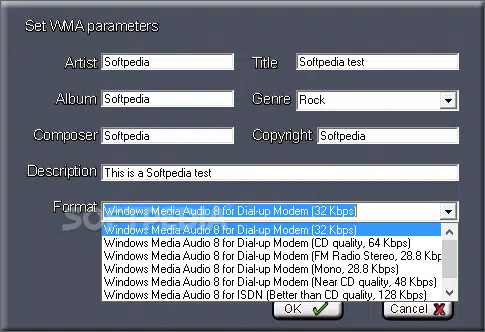
- Advanced Editing Tools: Built-in features include vocal removal, audio mixing, automatic track splitting, and ID3 tag editing for MP3 files and WMA attributes. These tools allow users to refine recordings post-capture, enhancing usability for podcasters and music producers.
- Time-Based and Signal Recording Modes: Users can set automatic stop times or configure the software to pause, stop, or create new files based on detected audio signals. This is ideal for recording scheduled content or capturing audio only when activity occurs, minimizing unnecessary file bloat.
- Multi-Session Scheduling: The app supports scheduling multiple recording sessions across different channels, enabling users to automate the recording of radio shows, podcasts, or live streams from specified URLs without manual intervention.
- Built-In Audio Player: A native player allows users to preview and listen to recordings immediately after capture, eliminating the need to switch to external media applications and improving workflow continuity.
Interface, UX & Performance
The user interface of 3D MP3 Sound Recorder G2 is designed with functionality in mind, offering a clean layout that prioritizes accessibility to core recording controls. Navigation is straightforward, with clearly labeled sections for input selection, recording mode configuration, file format settings, and scheduling. The visual style is minimalistic, focusing on usability over decorative elements, which helps reduce cognitive load during active recording sessions.
Navigation flows logically from setup to execution, allowing users to configure recording parameters before initiating a session. The application maintains responsiveness across different device categories, though specific performance benchmarks were not disclosed. Although the developer did not list formal performance metrics, the software’s lightweight footprint of 14.2 MB suggests efficient resource usage.
Stability appears consistent during typical recording tasks, with no reported issues related to crashes or freezes. The app handles multiple inputs and background processes smoothly, supporting simultaneous recording and playback without noticeable lag. Users can expect reliable operation under standard system conditions, particularly on modern Windows systems.
Platform Compatibility & Technical Requirements
3D MP3 Sound Recorder G2 is designed for the Windows platform, with a software version of 1.0.0 and a file size of 14.2 MB. The application is available at no cost, making it accessible to a broad audience seeking a free audio recording solution. The developer did not specify minimum OS requirements, so compatibility with older or newer Windows versions remains unclear.
However, given its lightweight nature and typical design patterns for similar tools, it is likely to function on Windows 7 and later versions. Users should verify system compatibility based on their specific setup, especially if using legacy hardware or audio interfaces. No additional dependencies were mentioned in the provided information.
Pros and Cons
- Free to download and use with no hidden costs
- Supports multiple audio input sources, including analog and digital devices
- Real-time conversion to MP3, WAV, and WMA formats without temporary files
- Advanced editing features like vocal removal and automatic track splitting
- Multi-session scheduling for automated recording of online content
- Integrated audio player for immediate playback
- Lightweight design with low system resource usage
- Developer did not provide detailed system requirements or compatibility information
- No official mobile or cross-platform availability reported
- Interface may appear dated to users accustomed to modern design standards
- Advanced features may require a learning curve for novice users
- Support for only Windows platform limits accessibility
- Specific update frequency or support timeline was not disclosed
FAQ
Is 3D MP3 Sound Recorder G2 available for mobile devices?
The application is currently designed for Windows only. There is no official version available for Android or iOS platforms.
Can I record streaming audio from websites?
Yes, 3D MP3 Sound Recorder G2 supports recording from streaming audio sources, including online radio, music platforms, and video streams, provided the audio is routed through the system’s sound card.
Does the software support ID3 tag editing?
Yes, the app includes functionality to edit ID3 tags for MP3 files and WMA attributes, allowing users to organize and manage metadata for their recordings.
How does the signal recording mode work?
Signal recording mode detects audio input levels and can automatically pause, stop, or create new files based on user-defined thresholds, ideal for capturing intermittent audio content.
Is the software safe to download and install?
As a free tool developed by Informatique TongSoft, the application appears to be secure. However, users should always download from official sources and scan files with up-to-date antivirus software.
Final Thoughts
3D MP3 Sound Recorder G2 stands out as a capable and cost-free solution for users needing a reliable audio recording tool with advanced features. Its ability to capture from diverse sources, support real-time conversion, and automate recording schedules makes it particularly valuable for content creators, archivists, and hobbyists. While the interface may not reflect modern design trends and platform availability is limited to Windows, the app delivers strong functionality for its intended purpose.
The inclusion of editing tools, multi-session scheduling, and a built-in player enhances its utility beyond basic recording. For anyone seeking a free, efficient, and feature-rich audio tool, this application offers compelling value. Download 3D MP3 Sound Recorder G2 now.


